
After a period of continuous development, we’re excited to introduce Meta Box AIO 3.6, bringing many essential new features and improvements.
This release not only enhances Meta Box itself but also ensures better compatibility with the WordPress ecosystem, especially with WordPress 7.0 just around the corner.
All of these changes focus on one goal: making your workflow faster, smoother, and more stable.
In this blog post, we’ll walk you through the key highlights:
- Blocks: Upgrade all blocks to API version 3 and move to modal-based editing for iframe compatibility.
- Block Editor field type: Improved allowed block management with predefined lists.
- Block toolbar position: More flexible placement options
- Saving workflow (custom post types, field groups, views, relationships, settings pages)
All features are now available; you can update and try them right now.
Blocks Update: Compatibility with WordPress 7.0
As you may know, WordPress 7.0 will be the first major release of 2026, including updates to the block API and an iframe-based editor. These improvements are great for the ecosystem, but they also change how our blocks behave, especially when working with advanced field types.
To keep everything running smoothly, we’ve updated MB Blocks with a new approach: switching to modal-based editing and upgrading all blocks to API version 3.
Upcoming WordPress Changes and Their Impact on Custom Blocks
In WordPress 7.0, the post editor is planned to always work as an iframe. This is part of a broader effort to modernize and standardize the editing experience. At the same time, WordPress encourages developers to migrate blocks to API version 3.
Because of this change, the editor is now isolated from the main admin interface. It has its own environment for scripts and styles, which helps reduce conflicts and ensures a more consistent experience across sites.
However, this also introduces challenges for custom blocks, especially when working with complex field types.
When using context = normal, blocks previously relied on API version 2. This difference in API versions can lead to JavaScript issues in certain field types, such as WYSIWYG editors, file and image uploads, select fields, and nested block editors. As a result, the editing experience may become less smooth or inconsistent. In other words, inline editing becomes less reliable in this new environment.
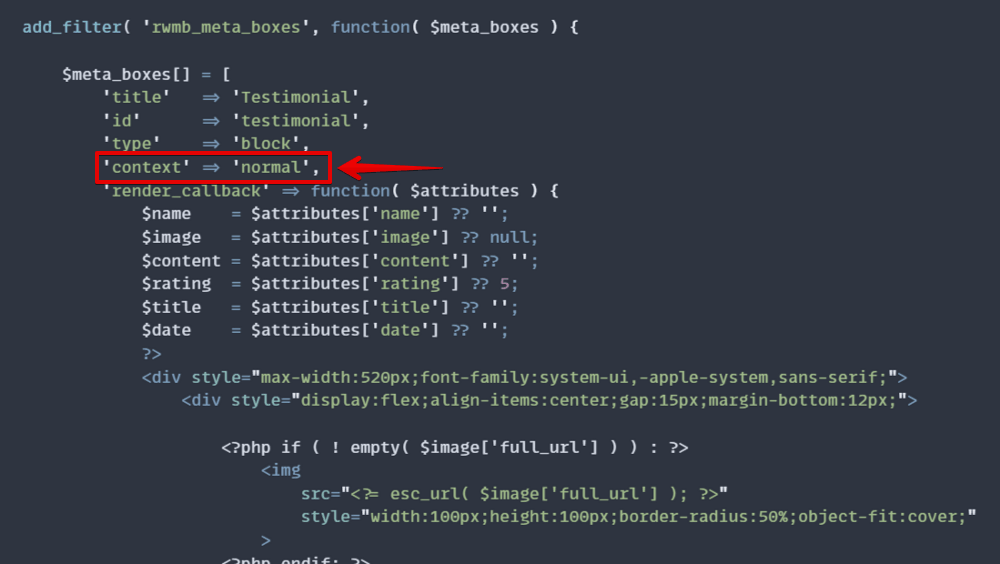
Our Solution: Moving to Modal-Based Editing
To address these challenges, all blocks will be updated to use API version 3, ensuring full compatibility with WordPress 7.0.
We’ve changed how fields are edited. Instead of editing fields directly inside the block (inline editing), now, when you click on the Edit icon, a modal opens to provide a dedicated space for editing and managing all fields.

Because the modal runs outside the iframe and within the WordPress admin screen, it avoids the editor’s limitations and ensures all fields work reliably. No additional setup is required, and everything continues to work as expected.
While this changes the interaction slightly - adding one extra step to open the modal, it significantly improves stability across all field types.
The Predefined Allowed Block Lists
When we first introduced the Block Editor field type, we received valuable feedback from our community regarding the allowed_blocks setting. Based on that feedback, we’ve refined this feature to make it faster and easier to use.
We now provide predefined block lists that you can easily use, edit, remove, or even create your own from scratch.

You can also import/export any list you want on this interface.
This gives you greater control over which blocks are selectable, helping you streamline the editing experience, maintain consistency across projects, and save time when configuring block settings.
What do you think about it?
Flexible Block Toolbar Position
You can now control where the block editing toolbar appears: at the top of the screen, in a fixed position, or directly above each block.

For example, I set the toolbar at the top, so in the post editor, you can see it as below:

This flexibility allows you to choose the most comfortable editing experience, especially when working with multiple blocks or complex layouts.
Faster Saving with Ctrl + S
In the new UI, we changed the button in the field setting to simply Save Changes. However, if you’re familiar with working on your keyboard, now you can use Ctrl + S to quickly save any objects, including custom post types, field groups, views, relationships, and settings pages.
This small but powerful enhancement helps you work faster and reduces interruptions.
Final Thoughts
With this release, Meta Box takes an important step forward in both compatibility and usability.
By aligning with WordPress 7.0, through Block API v3 and iframe editor support, we ensure a more stable and consistent editing experience. At the same time, workflow improvements like flexible toolbar positioning and faster saving help you work more efficiently every day.
User experience is always our top priority, and this update reflects our commitment to making Meta Box more powerful and easier to use.
Update to the latest version of Meta Box, try the new experience, and let us know what you think.
 Block Editor - The New Field Type That Goes Beyond WYSIWYG
  What’s New in Meta Box AIO 3.3.0: Powerful Updates for Models, Columns, and Views
  Gutenberg and the Future of Meta Box