
MB Relationships is great at many-to-many connections - events linked to multiple bands, posts linked to multiple related articles, and so on. But a lot of real-world data does not work that way. A product belongs to one brand. An employee sits in one department. An order has one customer.
Until now, enforcing those rules was on you. Editors could pick multiple items by mistake, or link something that was already taken. You would need custom validation or manual cleanup.
Has one relationship feature fixes that. Enable it on either side of a relationship, and each item on that side can connect to only one item on the other. The plugin handles the rest: the field becomes a single select, already-connected items disappear from the dropdown, and the rule is enforced when saving and through the API.
Update to the latest version of Meta Box Lite or Meta Box AIO to get started.
What you can build
| Pattern | Enable on | Example |
|---|---|---|
| Many-to-one | "From" side (the "many" side) | Many employees → one department |
| One-to-many | "To" side (the "many" side) | One brand → many products |
| One-to-one | Both sides | One user ↔ one profile page |
Enable it on the side where each item should have only one connection. Leave the other side open if many items can share the same partner.
Quick setup with MB Builder
- Go to Meta Box → Relationships and open a relationship (or create a new one).
- On the General tab of the side you want to restrict, check Has one relationship.
- Save.
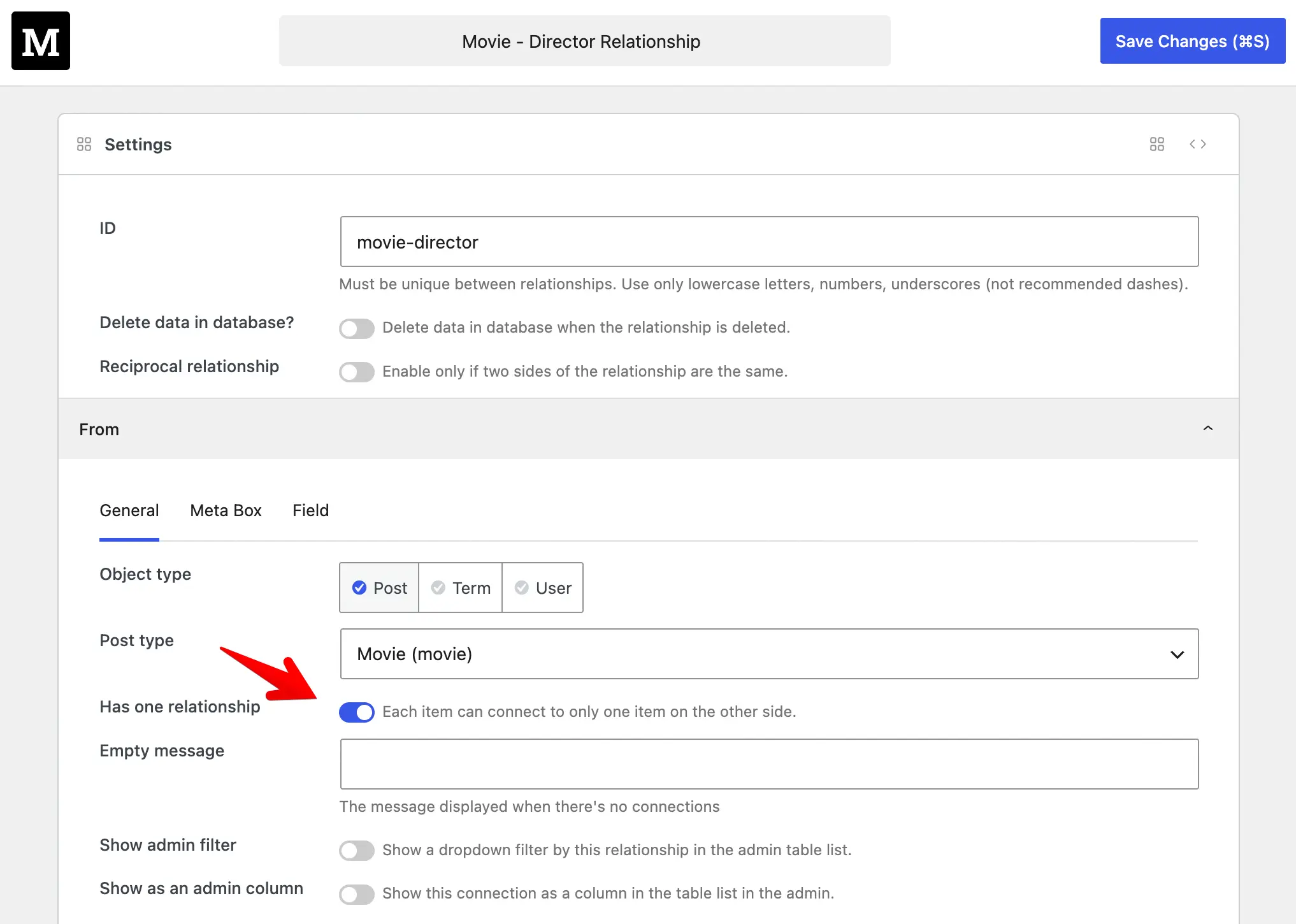
That is it. On the restricted side, editors see a single-select field instead of a cloneable list. If you also enable it on the other side, items already linked elsewhere will not appear in the dropdown.
Quick setup with code
Add 'has_one_relationship' => true to the from or to array:
add_action( 'mb_relationships_init', function () {
    MB_Relationships_API::register( [
        'id'   => 'products_to_brands',
        'from' => [
            'object_type'          => 'post',
            'post_type'            => 'product',
            'has_one_relationship' => true,
        ],
        'to'   => 'brand',
    ] );
} );
For a strict one-to-one relationship, set it on both sides. Querying and the rest of the MB Relationships API work exactly as before.
Upgrade to use it
Has one relationship is available in the latest version of Meta Box Lite and Meta Box AIO. Both bundles include MB Relationships and MB Builder, so you get the full UI and all the code APIs in one package - no need to hunt down individual extensions.
Update your plugin, open Meta Box → Relationships, and check the box. No migration, no extra configuration.
If you are still running an older setup, you are missing built-in support for one-to-one and one-to-many relationships. Get Meta Box Lite for free, or upgrade to Meta Box AIO for the complete toolkit.

 How to Filter Posts by Relationships - P2 - Using MB Views
  How to Filter Posts by Relationships - P1 - Meta Box + Bricks
  How to Display Related Posts Based on a Shared Relationship - P2 - Using MB Views
Excellent update