
According to the roadmap, WordPress 7.1 will officially release on August 19th with a long list of changes. If you use Meta Box to build custom fields, custom blocks, or manage content on client sites, a few changes in this version are worth paying attention to - not because they add new buttons to click, but because they affect how the editor works and how your existing setup behaves after upgrading.
Here are the changes that matter most for WordPress users, including Meta Box’s.
Force Use of the Iframed Editor
This is one of the biggest architectural changes in WordPress 7.1. Previously, sharing the same browser document between the editor and the WordPress admin interface could lead to a few common problems. For example, CSS and JavaScript from the admin injected by plugins and themes that leak into the editor and change how blocks looked or behaved.
WordPress now renders editor content inside an isolated iframe, separating the editing canvas from the admin interface around it. By placing the content inside an iframe, it acts as an isolated window, preventing WordPress admin CSS from interfering with the actual design of your post. Blocks behave more consistently, regardless of which plugins or themes are installed.
So, how does it affect WordPress users and Meta Box users?
Most users probably won't even realize this change exists. However, the plugin and theme developers (like Meta Box) will notice a major difference in how they work, because this feature directly affects compatibility between blocks, plugins, and themes inside the editor. The editor matches the front-end exactly, and the CSS conflicts are fewer.
Moving to an iframe-based editor encourages developers to adopt Block API v3, which has become the recommended standard.
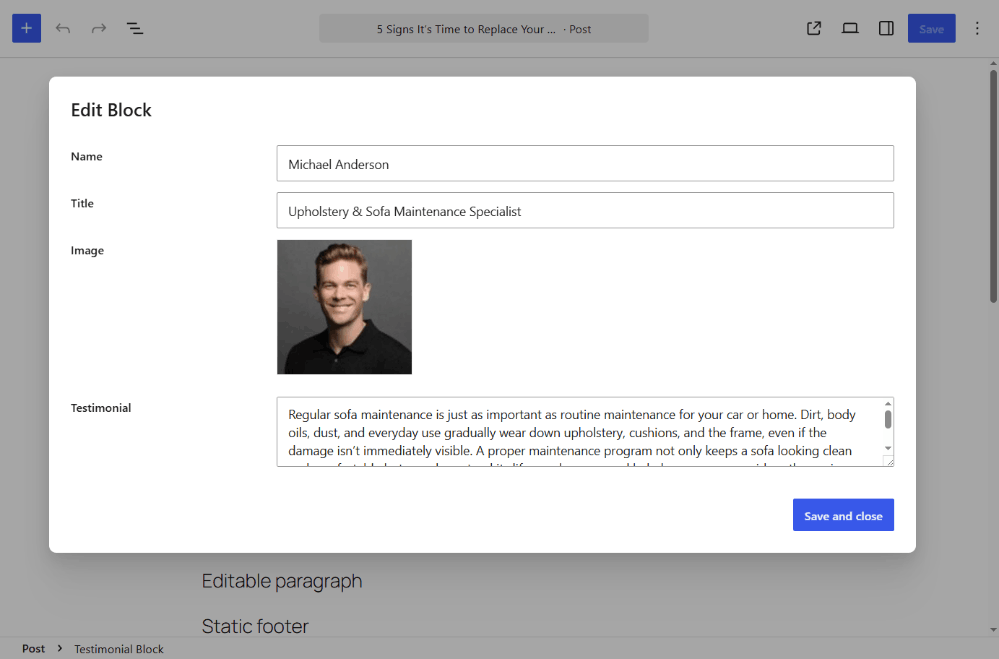
This is likely the most important technical change in 7.1 for Meta Box users who work with Gutenberg blocks. Meta Box has already upgraded custom blocks to work seamlessly inside the iframe editor without compatibility issues. All blocks are updated to API v3 and move to modal-based editing for iframe compatibility.
Editable Blocks Inside the Custom HTML Blocks
The Custom HTML block has always been useful for advanced users, but editing raw HTML comes with obvious risks. A single missing closing tag or misplaced character can easily break an entire layout.
WordPress 7.1 improves this workflow by allowing editable blocks to exist inside a Custom HTML block. Instead of forcing editors to modify raw HTML, developers can now expose specific areas for editing while protecting the surrounding markup and design.
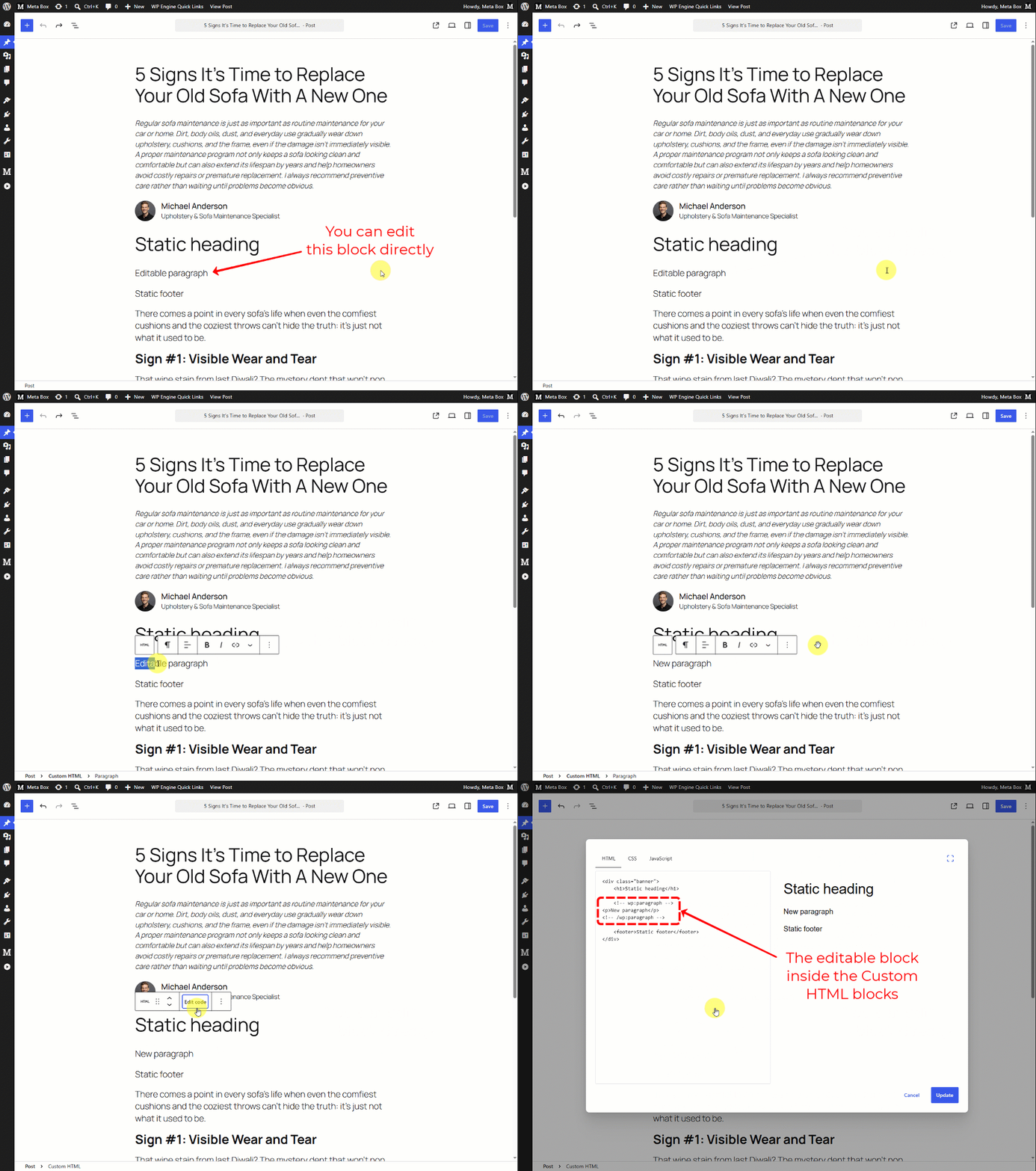
It does not replace a page builder, and building Custom HTML blocks is still not straightforward. But for block developers, it adds another way to control what clients can and cannot change.
Client-Side Media Processing for Better Performance
Before WordPress 7.1, every image upload triggered server-side processing in PHP, and WordPress generated thumbnails and intermediate sizes on the server. On sites with heavy media use, that adds CPU and memory load.
WordPress 7.1 changes that workflow by performing much of the image processing directly in the user's browser before the upload is finalized. The server mainly stores the processed files instead of generating them itself.

As a result, the performance of the server will be optimized significantly:
- Lower server resource usage
- Faster uploads on many hosting environments
- Better scalability for image-heavy websites
This change also applies to all types of media uploads, including Meta Box's image upload fields like Image and Image Advanced. You don't need to change anything in your field settings - it just works.
Other Improvements
Beyond the major updates that I mentioned above, WordPress 7.1 also brings a few smaller updates that may affect day-to-day editing:
First, introduces a persistent toolbar that keeps navigation more consistent across different editing experiences. Returning to the dashboard or navigating between screens feels much more natural and convenient.
Moreover, you can also register and render custom SVG icons. So whether you’re a theme developer or content creator, you have more options for displaying data as you need.
New styling will be supported in the block editor, such as text shadow in global styles, minimum width, and background gradient. These updates give you visual control the block styling directly - without needing custom CSS.
For the classic block, WordPress 7.1 initially intended to hide it to phase it out and encourage full adoption of the modern block editor. However, this decision was reversed to support users who aren't yet comfortable with blocks, ensuring the Classic block remains available for those who value its familiarity.
Final Thoughts
WordPress 7.1 focuses on making the editing experience more flexible and better performance.
For most users, this version brings a more powerful editor, better HTML editing, and faster media uploads. Site owners can also expect lower server load when handling large numbers of images.
The plugin/theme developers and Gutenberg users gain the biggest advantages from this release. The iframe editor and editable blocks inside Custom HTML make it easier to build custom blocks, and other developer-focused changes give future WordPress development a stronger foundation.
Meta Box users can upgrade without changes. Our custom blocks already support the iframe editor through Block API v3, so they keep working in WordPress 7.1.
Have you upgraded to WordPress 7.1? Let us know what you think.

 Meta Box Update: Block API v3, Iframe Editor Support, Smart Allowed Blocklists, and More
  Meta Box is Now Compatible with Gutenberg
  Gutenberg and the Future of Meta Box
I wonder if a lot of these changes will not have any effect if one does not use Gutenberg or Blocks? I disable Gutenberg and don't use Block Editing. If anything, I use views and then create custom fields for the client to change if they want to make a content shift.
Also, if I am not using Views, I am using Bricks and still have Gutenberg disabled, always have and always will.
If you’re not using Gutenberg, most of the updates I mentioned in the article won’t affect you. Only the changes related to media, UX, and the API may have an impact on your experience, including:
- Consistent navigation with persistent toolbar
- Media Library infinite scrolling is now enabled by default, with a per-user opt-out
- Client-Side Media Processing
- Registering and rendering SVG icons
- JSON Schema preparation for client compatibility
- Abilities API improvements
- jQuery UI update
For details, you can check the releases.
Hey Lua,
Perfect, thanks for the info and the great work you folks do. =]