AI coding tools have significantly improved my productivity when developing Meta Box and Slim SEO, helping with bug fixes, new features, maintenance, and documentation. Of the many tools I've tried, three stand out: Cursor, OpenCode, and Command Code. In this article, I'll share my thoughts on these tools based on my own experience using them for development.

Here's the short version, based on my own experience:
- Pick Cursor if you want one place to prompt, review, and edit code across a large codebase.
- Pick Command Code if you want an inexpensive way to try many models, or you want a tool that learns your coding preferences over time.
- Pick OpenCode if you want free code reviews or full control over which model providers you use.
Pricing changed a lot in 2026, especially for Cursor, so I've updated every price in this article. Since I've already published a detailed review of Cursor, most of this article focuses on OpenCode and Command Code, then compares all three for WordPress work.
What I looked at
I judge these tools by what matters in day-to-day WordPress plugin development:
- How reliably they fix bugs and build features in a PHP and JavaScript codebase.
- How well they handle code review.
- How easily I can review and edit the code they write.
- How much it costs to use them every day.
- How easily they adapt to my coding preferences.
The star ratings in the comparison table are my personal judgment on a 1 to 5 scale, not benchmark scores.
Command Code
Taste: Learning Your Coding Preferences
This is what makes Command Code particularly useful in my workflow. It automatically learns from your prompts, accept and reject decisions, naming choices, and other micro-decisions, then writes them back as project-level skills in .commandcode/taste/.
Taste can also learn from other coding agents or any repo with a single command. If you already use Claude Code, Cursor, or another agent, one command lets Command Code learn your existing preferences instead of starting from scratch. You can also point it at a local repository or a GitHub repo to extract coding patterns, naming conventions, and project structure into a reusable package.
This is my taste generated by Command Code:

This makes it easier to carry the same coding preferences across projects and agents. Over time, it needs fewer instructions to produce better results.
Pricing and Model Access
I use the Go plan, which costs $1/month and includes $10 in credits. It gives access to many open-weight models such as DeepSeek, Qwen, and MiniMax. They handle the key tasks of product development well, including maintenance, feature development, documentation, and bug fixes.
Command Code also offers deals on credits. Depending on the offer, you can get more than 10x the credits, and some deals come with credits that never expire. For example, boosted credits on DeepSeek V4.1 Flash and GLM-5.3 Flash currently make the $10 Go credits worth more on those models, and a few models such as Beam 1.0 are free while capacity lasts. If you outgrow Go, GOAT costs $10/month with up to $100 in credits, and Pro costs $20/month with up to $110. Each plan has 5-hour and weekly usage limits (Go: about $2 per 5 hours and $5 per week), so check the pricing page before choosing.

With such a low entry cost, Command Code offers solid value for the quality of its output, which is why it's one of my top three AI coding tools.
Cons
- It sometimes struggles to fix multiple similar or related issues at once, so I need to send follow-up prompts.
- Responses can become unnecessarily long, or switch to a different solution instead of building on the previous one.
- Language consistency is occasionally an issue. I've received responses in Chinese even though my prompts and codebase were in English.
- Unlike Cursor, you need a separate code editor to review and edit files. That can slow you down and disrupt your workflow.
OpenCode
Free Models and GitHub Integration
If you want to try OpenCode before paying, you can use its free models for coding. As of October 28, 2026, OpenCode lists free models such as Big Pickle, GLM-5.3-Flash, DeepSeek V4.1 Flash, MiMo-V2.6-Flash, and Beam, all free for a limited time. OpenCode updates this list often, so the free models you see may differ from the ones above. Check the current list before you start.

These models are more than capable of handling everyday coding tasks. I use them for code reviews on my Meta Box GitHub repository, and in my experience they give genuinely useful and insightful feedback. The code review process is automatic and free. Cursor offers a similar feature, but it requires a paid plan.
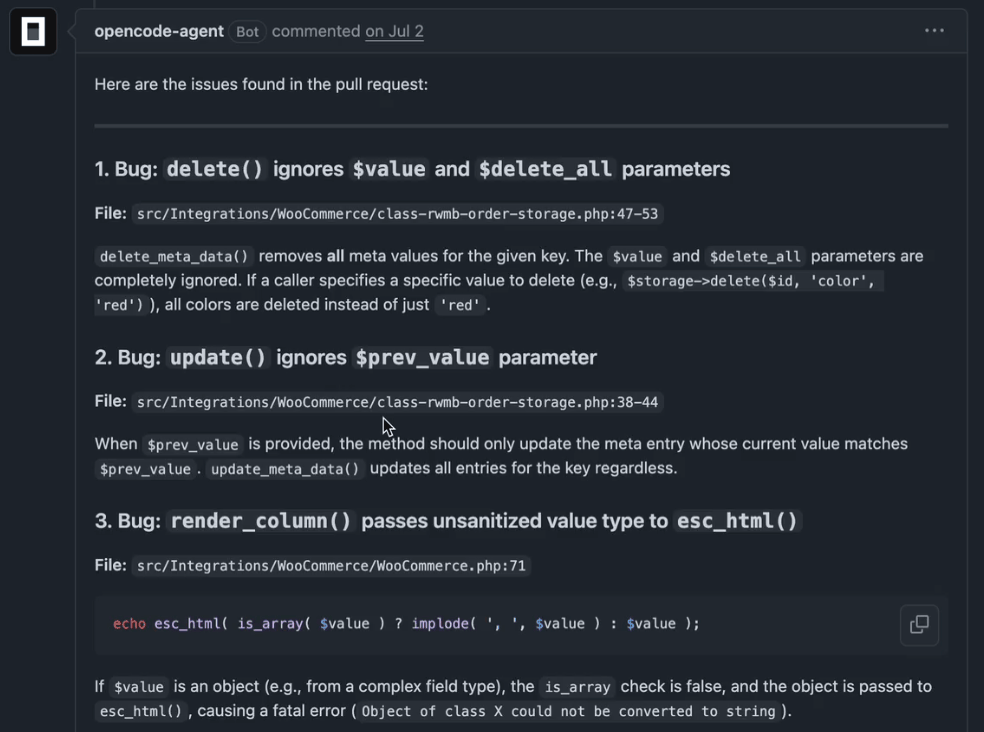
One caution for client and agency work: free models are often offered for a limited time, and some of them (for example Big Pickle and MiMo-V2.6-Flash) may use your prompts to improve the model during the free period, while others use zero-retention providers. Read the current terms before sending proprietary or client code to a free model.
Flexible Model Access
OpenCode supports connecting to external providers like OpenRouter. That gives you access to a wider range of models, including free ones those providers may offer. Even though OpenCode already includes free models, connecting other providers gives you more flexibility in choosing the right model for each task.

Pricing
OpenCode is budget-friendly in three ways:
- Free models for trying it out.
- Go, a subscription at $10/month with access to about 30 models, including DeepSeek, Kimi, GLM, MiniMax, and Claude Haiku 5.5. Usage is metered in dollars per model, with limits per 5 hours, per week, and per month. A higher Go Plus plan costs $40/month with roughly 4x the limits.
- Zen, a pay-as-you-go option. You add a $20 balance (plus a $1.23 card fee), and the provider's per-request charges pass through with no markup.
Plan details have changed several times this year, so confirm current limits on the OpenCode site.
Cons
- Like Command Code, it doesn't always fully resolve related bugs in a single prompt, so I sometimes follow up.
- When I ask for clarification or question its proposed solution, the response can become unnecessarily roundabout.
- You need a code editor to edit files, rather than making changes directly as you can in Cursor.
Cursor
Cursor is the tool I use most for Meta Box, and I've covered it in detail. In short, it gives me three features that streamline my development:
- Multi-repo context. It reads files and code from many repositories in the same workspace, so you don't need to move context around by hand.
- Review and edit in one place. I can check AI changes and fix small things myself in the IDE, without another prompt. This makes for a seamless workflow.
- Diverse model support. I can pick different AI models for different coding tasks, which helps optimize cost without compromising quality.
So far, I haven't run into any major downsides with Cursor's workflow.
Cursor's pricing changed in October 2026
This is the biggest update to this article. Cursor restructured its plans in October 2026. Where I previously wrote about Cursor Pro at $20/month, the current lineup runs from a free tier through Plus at $8 (Grok models only), Premium at $30, Super at $100, and Ultra at $200. Teams starts at $30 per user. Third-party models are not included in any plan and are billed separately at API list price, and only Premium and above can use them. AI code reviews are included from Premium up.
That makes model choice even more important for cost.
Comparison Table
The table below compares the three tools on features and pricing, based on my personal experience.
| Command Code | OpenCode | Cursor | |
| Price (Oct 2026) | Go: $1/month, $10 credits; GOAT: $10, up to $100 credits; Pro: $20, up to $110 credits | Free models; Go: $10/month; Go Plus: $40/month; Zen: pay as you go ($20 balance) | Free; Plus $8 (Grok only); Premium $30; Super $100; Ultra $200; third-party models billed at API rates |
| Model support | ⭐⭐⭐⭐ (Quality models with good deals) |
⭐⭐⭐⭐ (Free models can handle development tasks) |
⭐⭐⭐⭐⭐ (Flexible models for different coding tasks) |
| Response quality | ⭐⭐⭐ | ⭐⭐⭐ | ⭐⭐⭐⭐⭐ |
| Code review | ⭐⭐⭐⭐ (Free and automatic) |
⭐⭐⭐⭐⭐ (Paid plans) |
|
| Edit code directly | Needs a separate editor | Needs a separate editor | ⭐⭐⭐⭐⭐ |
| Learning coding preferences | ⭐⭐⭐⭐⭐ | ⭐⭐ | ⭐⭐⭐⭐ |
| Language consistency | ⭐⭐⭐ | ⭐⭐⭐⭐⭐ | ⭐⭐⭐⭐⭐ |
| Connect to other providers, agents, GitHub | ⭐⭐⭐⭐ | ⭐⭐⭐⭐⭐ | ⭐⭐⭐⭐⭐ |
| Best for | Cheap model experiments and recurring tasks | Free code review and provider control | Daily work in a large codebase |
Final thoughts
For my current work, Cursor remains the most convenient option, particularly when I need to navigate a large codebase and review or edit files in one place. I'd consider Command Code when I want an inexpensive way to try different models, or to use Taste for recurring coding tasks. And I'd choose OpenCode when free code review and control over model providers are higher priorities.
Each tool has its own strengths, and choosing the right model for each task is just as important as choosing the tool itself. It helps keep costs under control while maintaining good output quality. There's no single best option for everyone, so consider your budget, your preferred workflow, and the tasks you handle most often.

 Write Correct Meta Box Code With AI: New Agent Skill and Coding Guide
 Cursor AI Review for WordPress Developers: 4 Most Useful Features While Building Meta Box
 Create WordPress Custom Fields with AI – An Exclusive Meta Box Experience