
WordPress adds the post type slug to every custom post URL, such as example.com/book/the-hobbit/. To remove the custom post type slug and get example.com/the-hobbit/, you need a plugin or custom code, because WordPress has no setting for it. The easiest way is the Remove post type slug from URL option in MB Custom Post Types: turn it on, save, and you're done.
This guide shows two ways to do it, the free plugin way and the code way, plus what to check so you don't break existing pages or lose SEO.
Why WordPress Adds the Post Type Slug to URLs
WordPress uses the URL to decide what to load. A URL like /the-hobbit/ could be a page, a post, or a custom post. The post type slug (/book/) tells WordPress to look for a book, so it can load the right content fast and without conflicts.
For many sites, the slug is useful. It groups content and makes the URL clear. But sometimes it's just noise:
- A portfolio where each project should look like a normal page.
- Landing pages built as a custom post type.
- Small sites where shorter URLs are easier to share.
Why Setting an Empty Rewrite Slug Doesn't Work
You might try 'rewrite' => [ 'slug' => '' ] or '/' when registering the post type. It doesn't work. WordPress falls back to the post type name, or creates broken rewrite rules that lead to 404 errors. Removing the slug needs two things: change the generated links, and teach WordPress to load the custom post from the short URL.
Method 1: Use MB Custom Post Types (No Code)
MB Custom Post Types is a free plugin to create custom post types and taxonomies with a UI. Since version 2.13, it can remove the post type slug with one option.
- Go to Meta Box » Post Types and edit your post type (or create a new one).
- Open the Features tab.
- Turn on Remove post type slug from URL.
- Click Save Changes.
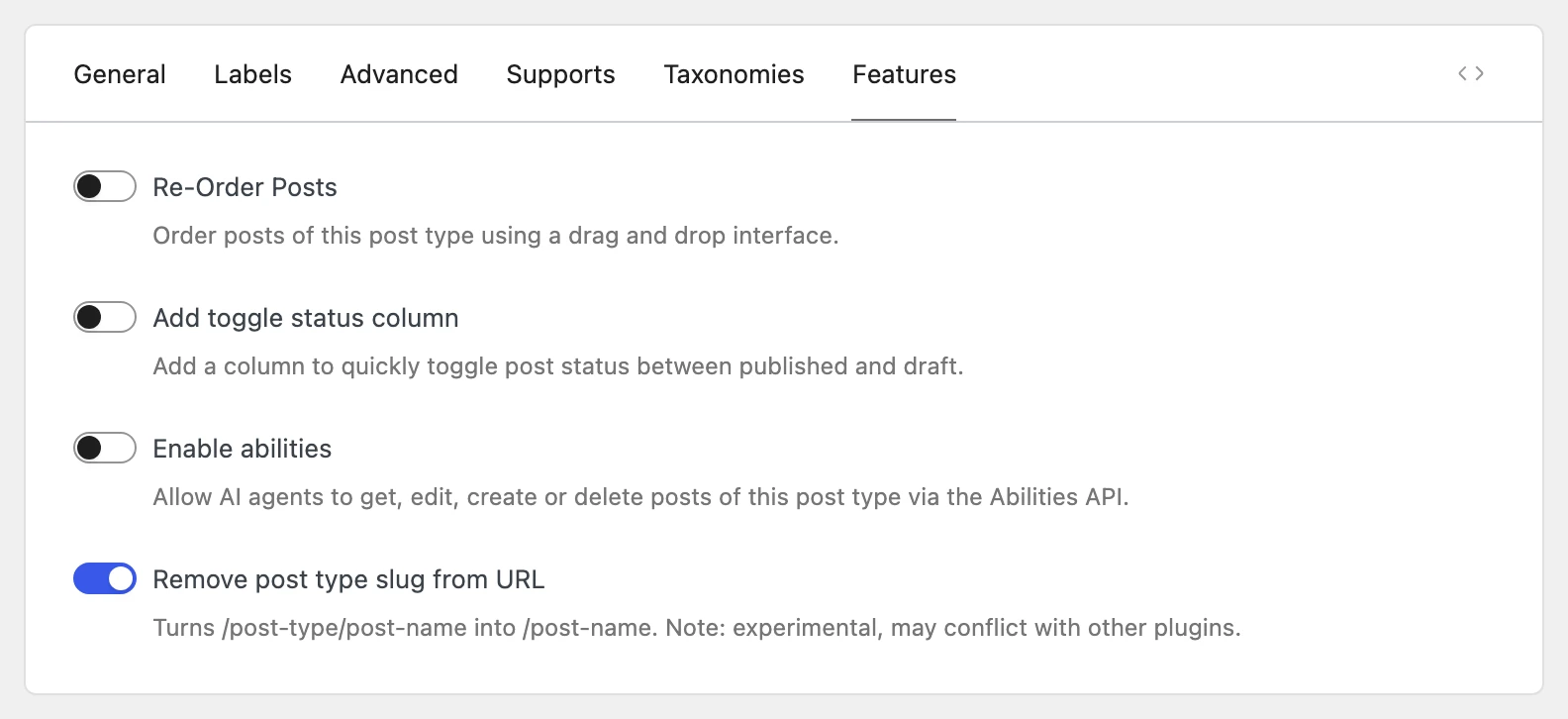
Your post URLs change from /book/the-hobbit/ to /the-hobbit/ right away. You don't need to resave the permalink settings.
How the Option Handles Edge Cases
Most snippets and plugins stop at changing the links. This option also takes care of the cases that usually break sites:
- Pages and posts come first. If a page or a post has the same path as a custom post, the page or the post opens. Your existing content never disappears.
- Old URLs keep working. Links to
/book/the-hobbit/still open the post, so you don't get 404 errors from old links, bookmarks, or search results. - One canonical URL. The canonical link on both URLs points to the short URL, so search engines index one URL for each post.
- Hierarchical post types keep the parent path, such as
/parent/child/. - Archives don't change. The post type archive keeps its URL, such as
/book/. - Only published posts open from the short URL.
The option is marked as experimental: plugins that also change permalinks or redirect URLs can conflict with it. After you turn it on, open a few posts and make sure they load correctly.
See the documentation for more details.
Method 2: Remove the Slug with Code
If you register post types with code, you can remove the slug with two filters. This example works for a non-hierarchical post type named book. Add it to your theme's functions.php file or a code snippets plugin:
// Remove the "book" slug from single book URLs.
add_filter( 'post_type_link', function ( $link, $post ) {
    if ( 'book' !== $post->post_type ) {
        return $link;
    }
    return str_replace( home_url( '/book/' ), home_url( '/' ), $link );
}, 10, 2 );

// Load a book when WordPress can't find a page or a post at the URL.
add_filter( 'request', function ( $vars ) {
    global $wp;

    if ( is_admin() || ! empty( $vars['post_type'] ) ) {
        return $vars;
    }

    $path = trim( $wp->request, '/' );
    if ( ! $path || str_contains( $path, '/' ) ) {
        return $vars;
    }

    // Keep existing pages and posts.
    if ( get_page_by_path( $path ) || get_page_by_path( $path, OBJECT, 'post' ) ) {
        return $vars;
    }

    $book = get_page_by_path( $path, OBJECT, 'book' );
    if ( ! $book || 'publish' !== $book->post_status ) {
        return $vars;
    }

    return [
        'post_type' => 'book',
        'name'      => $book->post_name,
        'book'      => $book->post_name,
    ];
} );
How it works:
- The
post_type_linkfilter changes the links that WordPress generates, so menus, archives, and sitemaps use the short URL. - The
requestfilter runs when WordPress parses a URL. If no page or post has that path, it looks for a published book with that slug and loads it.
Replace book with your post type. The snippet doesn't handle hierarchical post types (child posts with a parent path). For those, or if you don't want to maintain code, use Method 1.
How Removing the Slug Affects SEO
Shorter URLs are easier to read, share, and remember. But changing URLs on a live site has risks:
- Broken links. If old URLs return 404 errors, you lose the traffic and links that point to them. Both methods above keep the old URLs working.
- Duplicate content. If the old and the new URLs both work, search engines see two URLs for the same content. Make sure the canonical link points to the short URL. WordPress and SEO plugins like Slim SEO use the post permalink for the canonical link, so this works automatically with both methods.
- URL conflicts. Without the slug, a custom post and a page can have the same URL. Give each custom post a unique slug, and check that important pages still open after the change.
If your site is new, remove the slug before you publish content. If your site already ranks, the change is safe as long as old URLs keep working and canonical links point to the new URLs. Then update your internal links and resubmit your sitemap in Google Search Console.
Frequently Asked Questions
Can I Remove the Custom Post Type Slug Without a Plugin?
Yes, with custom code like Method 2. WordPress has no setting for it, and an empty rewrite slug doesn't work.
Is Removing the Post Type Slug Bad for SEO?
No, if you keep old URLs working and point the canonical link to the new URL. The risks are 404 errors on old links and duplicate URLs, not the short URL itself.
Does Removing the Slug Change the Archive URL?
Not with the methods in this guide. Only single post URLs change. The archive keeps its slug, such as /book/.
What Happens If a Page and a Custom Post Have the Same Slug?
With both methods in this guide, the page opens. To make the custom post reachable from the short URL, change its slug.
Can I Remove the Slug from Taxonomy URLs Too?
Not with these methods. They change only custom post URLs. Taxonomy URLs like /genre/fantasy/ keep their base.
Conclusion
Removing the custom post type slug gives you shorter, cleaner URLs. The hard part is not the links, but keeping pages, old URLs, and canonical links working. If you use MB Custom Post Types, turn on Remove post type slug from URL and it handles these cases for you. If you prefer code, use the snippet above and test your URLs after the change.
Still deciding how to structure your content? Read Custom Post Types, Taxonomies, or Custom Fields: Which Should You Use? And see what else is new in Meta Box AIO 3.14.

 How to Filter Posts by Custom Fields and Custom Taxonomies on Archive Pages
 How to Create a Custom Post Type in WordPress Using Code or Plugin?
 How to Easily Add Custom Taxonomy Using Codes and Plugins in WordPress